
Honda radio code: How to get a Honda Radio Code For Free
Learn how to get a Honda radio code for free
Modern car radios often have anti-theft features that disable the radio when power is disconnected. This security measure is intended to deter thieves, but it can also be a hassle for car owners. When you disconnect the battery, the radio loses its memory, including presets, custom settings, and sometimes even its operating state. To reactivate it, you might need to enter a security code. The Honda radio unlock code came with the vehicle and is usually placed in the owner’s manual. If you don’t have that and need to get a Honda radio code, here’s how to get the code for free
First, get the serial number from the radio.
Here’s how to get the radio serial number on a 2002 or newer Honda:
1) Press and hold radio preset buttons 1 and 6.
2) While holding down these buttons, turn your key in the ON position (not the START position).
3) After a few moments, your stereo serial number will display a 10-digit alphanumeric code. This is the radio serial number that you’ll have to write down.
Here’s how to get the radio serial number on a 2001 or older Honda:
The radio serial number is located on the body of your radio unit. You’ll need to remove the radio from the dash to access it. Consult your owner’s manual on how to remove the radio properly, or bring your vehicle to a professional if you’re unsure. Removing the radio improperly can damage the unit and dash.
Once you have the radio serial number, here’s how to get the radio unlock code online for free
1. Accessing Your Honda Radio Code Online
Go to: https://mygarage.honda.com/s/radio-nav-code?brand=Honda. You will need your Vehicle Identification Number (VIN), phone number, and zip code matching the information on file with Honda and the radio serial number. You can retrieve your code through the website Sunday-Friday 4:00AM – 9:00PM PST and from 4:00AM – 6:30PM on Saturdays
Accessing your Honda Radio Code By Phone
Call Honda America Client Services at 1-800-999-1009. You will need to provide your VIN number and radio serial number, as well as proof of ownership (copy of your vehicle title or your insurance card showing the vehicle VIN).
Accessing your Honda Radio Code at the Dealer
Drive to your local Honda or Acura dealer and provide your radio serial number and proof of ownership.
To enter the code:
1) Turn key to ON
2) Turn on radio and wait until the word “CODE” appears.
3) Enter the Honda radio code on the radio station buttons. If you enter the right code, the radio will operate properly.
EXAMPLE: If the Honda unlock code is 33351, you would press the radio preset button “3” three times, preset button “5” once, and “1” once. This should unlock and reset your car’s audio system.
How to prevent locking your Honda Radio
To avoid losing the radio code in the future, use a jumper pack and adapter cable to retain the power to the PCM and all internal computers. Buy the Solar ESA30 OBD memory saver cable.
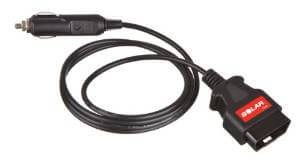
Solar ESA30 OBDII Memory Saver Cable
Connect the cigarette lighter portion to the socket on your booster pack with the battery still connected. Then, insert the other cable end into the OBDII connector under your dash. You now have battery power flowing into the vehicle.
Next, remove the negative battery cable and set it aside. Then, remove the positive battery cable and insert it into a plastic, leather, or rubber non-conductive item. This positive battery lead is LIVE and will short to any metal surface, so you MUST insulate it. But open a pop bottle, shove the terminal into it and tape it in place with electrical tape. OR, insert it into a leather glove and tape the glove closed. Then move the cable away from the battery while you remove and replace the battery.
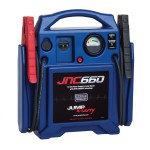
Jumper pack
Install the positive terminal onto the new battery first, followed by the negative cable. Then remove the memory saver cable from the OBDII port. This procedure will save the radio code, retain all the computer’s adaptive memory, retain throttle body position settings, HVAC settings, anti-theft settings, and radio codes.
©, 2014 Rick Muscoplat
Posted on by Rick Muscoplat