
Check engine light, but no codes stored
Check Engine Light, No Codes? Here’s What You Need to Do
I’ve seen plenty of DIYers in Reddit Subs who are puzzled because they have a check engine light with no codes on their scan tool. They plugged in their scanner, expecting to find a clear answer, only to see “no codes found” staring back at them. If you’re in this situation, don’t panic—this doesn’t mean your vehicle is broken beyond repair. Instead, it’s a sign that you must take a more methodical approach to diagnosing the issue. Let’s go over what this means, why it happens, and what you should do next.
Understanding trouble codes, code readers, and scan tools
The On-Board Diagnostic II system was designed with a list of Generic Powertrain (P) trouble codes that all automakers use. All inexpensive code readers and scan tools are designed to read the entire range of generic powertrain (P) trouble codes.
However, there are thousands of other codes like:
• Enhanced P codes—Carmakers can use enhanced codes for issues specific to their brand. Enhanced P codes start with P1000 and go to P2999. Enhanced codes are not only manufacturer-specific but sometimes even year, make, and model-specific. So, a P1252 trouble code may mean “Pedal Correlation PDS1 and LPDS High” on one car maker’s model, but something else may be on the same car maker’s other model.
Because of that level of specificity, most inexpensive code readers and cheap scan tools can’t read enhanced codes. In other words, your vehicle may have set an enhanced trouble code and a check engine light, but your code reader isn’t equipped to read enhanced codes.
Not all code readers or scan tools can read all types of trouble codes
Carmakers constantly add enhanced trouble codes to cover additional components in late-model cars. To accommodate those changes, the more expensive code readers provide a way to update the toolset memory by connecting to an online portal.
Here’s an example of a $35 code reader from Harbor Freight. I’ve downloaded the user’s manual and clipped out the relevant section to show exactly which codes it can read. Notice that it can read Generic codes and manufacturer-specific P1000, P3000, and U0000 series trouble codes. However, it can’t read any Body (B), or Chassis (C) codes and the device doesn’t have any way to update.
If your car has check engine light with a stored B or C code, the scan results will show “No Codes Found.”
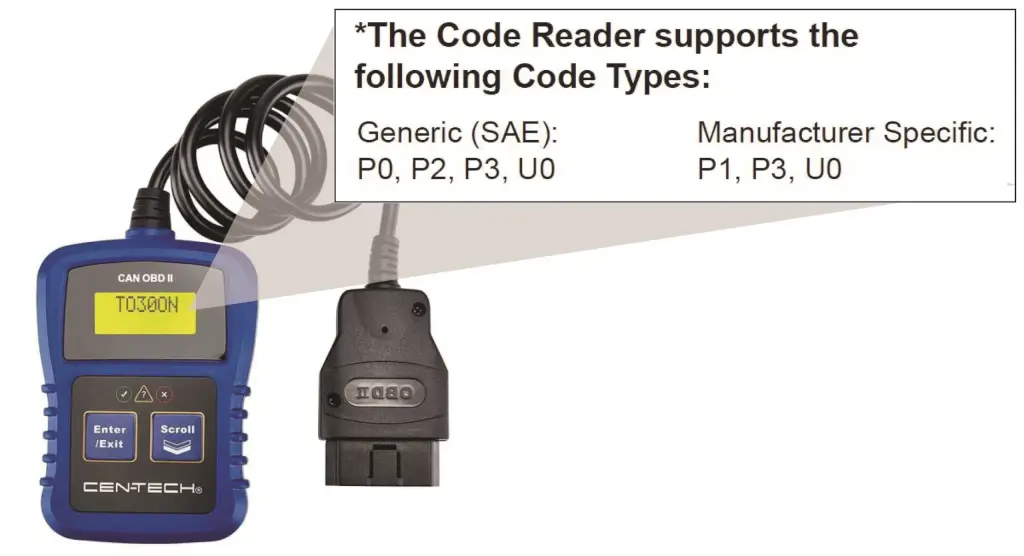
Notice that this code reader can’t read any B or C codes
If you have a check engine light on but no codes are stored, you might have one of these stored codes
B Body codes
C Chassis codes
U Communications codes.
• B body codes are used for: airbags, power seats, HVAC, and other body systems.
• C codes are used for: brakes, suspension, or “chassis” related faults.
• U codes are used for: Network communication issues between body computers, the ECM, TCM, and other digital modules.
If your code reader or scan tools can’t read B, C, or U codes, that’s why you have a check engine light on but no codes stored. Your code reader can’t read those codes. Trust me, the codes are stores. The ECM will never turn on the check engine light but will also set a code in memory.
What Are Your Options If You Can’t Read The Code(s)?
Your ECM doesn’t have a mind of its own. It will only turn on the check engine light if a trouble code has been stored. If your scan tool can’t find the code, the problem is your scan tool, not the ECM.
In other words, you need to buy or rent a scan tool with more professional capabilities, or pay a shop to scan your vehicle. Forget about the auto parts stores. Their scan tools only scan generic P trouble codes, not enhanced, C, B, or U codes.
©, 2015 Rick Muscoplat
Posted on by Rick Muscoplat