
How to Troubleshoot Ford Wipers That Won’t Turn Off
Solve the Mystery of Ford Wipers That Won’t Turn Off
If you’re a Ford owner experiencing windshield wipers that won’t turn off, you’re not alone. This frustrating issue can stem from various causes, ranging from simple switch problems to more complex electrical issues. Let’s explore the possible reasons and solutions for this common Ford problem.
How late-model Ford wiper systems work
The multifunction wiper switch contains multiple resistors that drop the voltage based on the position of the switch. The switch is the input for the following functions:
Windshield wash
Off
AUTO 1/INT 1
AUTO 2/INT 2
AUTO 3/INT 3
AUTO 4/INT 4
AUTO 5/INT 5
Low wiper speed
High wiper speed
The multifunction switch connects to the steering column control module (SCCM) which communicates with the BCM via the high speed CAN bus. The wiper relay in the battery junction box is energized when the ignition is on. When the driver commands a wiper operation the digital command routes through the SCCM to the BCM which provides a ground to the wiper relay control coil mounted in the battery junction box.
If the Ford wipers won’t turn off
1) First, check the operation of the wiper relay in the battery junction box to see if the relay contacts are stuck in the ON position. Try tapping the relay with a screwdriver handle to vibrate the contacts. Or, swap the relay with another relay of the same size.
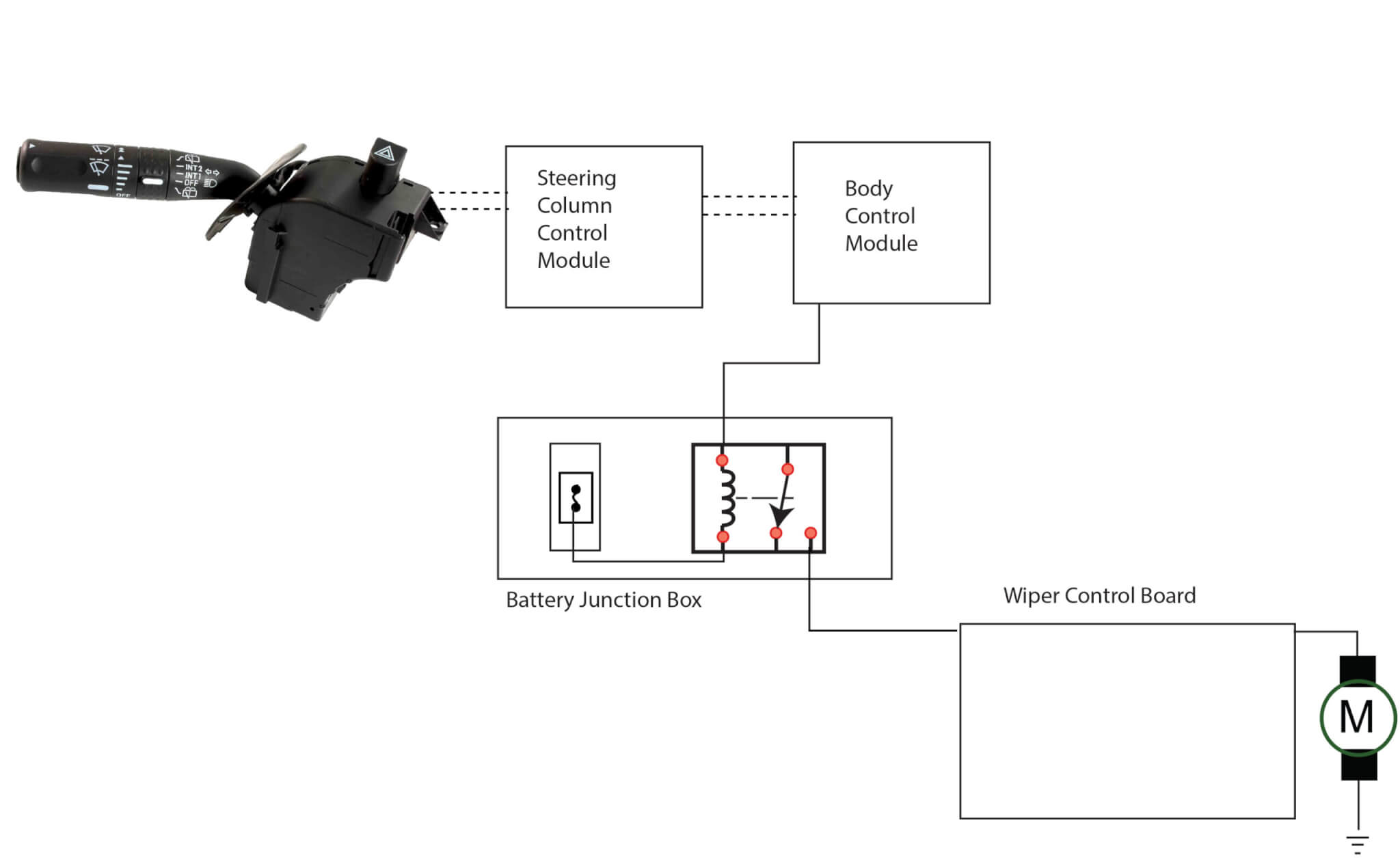
2) If the wiper still operates, use a scan tool

Ford Multifunction wiper switch
with live data to monitor the status of the multifunction switch. If the BCM sees a wiper request from the multifunction switch but the actual wiper switch is turned off, replace the multifunction wiper switch because the problem is inside the switch.
Replace the wiper switch
1) Remove the negative battery terminal from the battery.
2) Remove the screws from the underside of the shroud covering the wiper switch. Use a long-reach Philips screwdriver.
3) Unsnap the two shroud pieces to reveal the wiper switch.
4) Disconnect the electrical connector to the multifunction switch.
5) Remove the fasteners from the switch and swap in the new switch.
6) Reverse the procedure to finish the job.
©, 2023 Rick Muscoplat