
OBDII Scan tool Modes
Mastering OBDII Modes: How to Use Them to Diagnose Car Problems
If you want to move beyond simply reading trouble codes and truly understand what’s happening in a modern vehicle, you need to master OBDII modes. These built-in diagnostic functions are part of the standardized On-Board Diagnostics system and allow you to access far more than just basic code information. In my years of diagnostic work, learning how to use Mode $06, Mode 6, and Freeze Frame data has turned many frustrating repair jobs into quick, accurate fixes.
Understanding OBDII Modes
The OBDII modes are essentially “service modes” defined by the SAE J1979 standard. They tell your scan tool what type of information to request from the vehicle’s control modules. There are 10 standard modes (plus manufacturer-specific extensions) in every OBDII-compliant vehicle. Each mode has a specific purpose: some retrieve codes, some command system tests, and others display stored snapshots of vehicle data.
When you understand these modes and how to use them in real-world diagnostics, you gain access to the same type of information dealership technicians use daily. This means faster, more accurate problem-solving and less parts-swapping guesswork.
Mode 1 Read Inspection/Maintenance Readiness Monitors and Live data Test Sequences. Trips
Mode 2 Read Freeze Frame
Mode 3 Read Trouble Codes
Mode 4 Clear Trouble Codes
Mode 6 On-Board Monitoring Test
Mode 7 Continuous monitor fault code
Mode 8 Control Operation of On-Board Component System EVAP vent solenoid. Vent is normally open
Mode 9 Read vehicle information Vehicle ID.
Mode 10 Permanent DTC 2010 and later. Whatever criteria the mfgr programmed for failures.
How to Use Mode 1 — Live Data and Readiness Monitors
Live data is real-time data coming from the sensors in your vehicle. The scan tool screen will show the parameter I.D.s (PIDs) and the live data. This list shows some examples:
• Engine RPM
• Vehicle speed
• Intake air temperature
• Engine coolant temperature
• Mass airflow sensor reading
• Throttle position
• Oxygen sensor voltages
• Short- and long-term fuel trim
• Ignition timing advance
Select the PIDs you want to view. Some scan tools let you “select all,” but for faster refresh, pick only what you need. For example, if you’re diagnosing a P0128 cooling system problem, select only the data pertinent to the cooling system, like coolant temperature, intake air temperature, vehicle speed, and fan status.
Real World Example of Where You’d Use Live Data
Let’s use a P0171 System Too Lean (Bank 1) trouble code as an example.
The most common causes of a P0171 are: Vacuum leak, low fuel pressure, clogged fuel injector(s), clogged fuel filter, dirty MAF sensor, or an exhaust leak ahead of O2 sensor. In this case, you would want to see the following data.
• Fuel Trim Diagnosis— Use short-term fuel trim (STFT) and long-term fuel trim (LTFT) to see how much the PCM is adjusting fuel delivery.
• Oxygen Sensor Diagnosis: Watch O2 voltage switching — a lazy sensor will have slower transitions.
• MAF Testing: Compare MAF reading (grams/sec) at idle and WOT to expected values for the engine size.
• Throttle Position: Verify smooth increase from idle to wide open throttle.
What normal live data looks like
Engine RPM at idle: 650–750 RPM
Vehicle Speed: 0 (parked)
Coolant Temperature with engine at full operating temperature: 180°–210°F (82–99 °C)
Intake Air Temp (IAT): Ambient Temperature ±10 °F
Mass Air Flow (MAF) (grams/second): 2–7 g/s (per liter displacement at idle) ~80–100 g/s per liter displacement at Wide Open Throttle (See How To Calculate Grams per Second Based on Engine Size and RPMs below)
Manifold Absolute Pressure (MAP) ~17–22 inHg vacuum (~20–40 kPa) Atmospheric pressure (~100 kPa) at Wide Open Throttle
Throttle Position Sensor (TPS) ~0.4–0.8 V (idle) ~4.0–4.8 V (WOT)
Short-Term Fuel Trim (STFT) -5% to +5% Fluctuates quickly ±10%
Long-Term Fuel Trim (LTFT) -5% to +5% Slowly adjusts > ±10% long-term vacuum leak, injector, or fuel pressure problem
Oxygen Sensor (narrowband) Switches 0.1–0.9 V several times per second Slower switch at WOT (rich bias) Stuck high = rich; stuck low = lean; slow switching = aging sensor
Air-Fuel Ratio Sensor (wideband) Lambda = 1.00 (14.7:1 gasoline) Rich at WOT (~0.85 λ) If not changing with load
Ignition Timing Advance 5–15° BTDC at idle 20–40° BTDC at cruise
Calculated Load 15–35% 80–100% at WOT Low load at WOT → restricted exhaust or intake
Catalyst Temp (if available) ~300–400 °F at idle ~800–1,200 °F under load Low = lazy catalyst; very high = misfire dumping fuel into cat
Readiness Monitor status
In OBDII, readiness monitors are self-tests that the vehicle’s onboard computer runs to check that key emissions-related systems—like the catalytic converter, oxygen sensors, evaporative emissions system, and EGR—are working properly. Each monitor is either “complete” (test has run and passed), “incomplete” (test hasn’t run yet), or “not supported” (vehicle doesn’t have that system).
The two types of OBDII readiness monitors are:
Continuous Monitors – These run automatically any time the engine is operating. Examples include misfire detection, fuel system monitoring, and comprehensive component monitoring.
Non-Continuous Monitors – These only run under specific driving conditions, such as certain speeds, loads, or temperatures. Examples include catalyst efficiency, EVAP system tests, oxygen sensor tests, and EGR system checks.
Mode 2
When you enter this mode, you are telling the PCM/ECM to provide you with freeze frame data. This is the raw data that was stored when the trouble code was set.
In a real-world setting where you’re not performing your own diagnostics, this is where a mechanic would ask you questions such as:
Did this happen right after you started a cold engine?Where you accelerating hard at the time?
How fast were you going?
Here’s an example of how freeze frame data could help you. Let’s say you have a P0171 system too lean code, and the freeze frame shows:
RPM: 2,400
Load: 25%
Coolant temp: 195°F
Speed: 55 mph
This freeze frame data tells you the fault happened at cruise, with the engine at full operating temperature, not idle or WOT. So you’d focus on intake leaks, MAF accuracy, or fuel delivery under light load rather than idle-only issues.
Prioritize Which Codes to Diagnose First
• Misfire codes (P0300–P030x) should be addressed first — running a misfiring engine can damage the catalytic converter quickly.
• Fuel/air mixture codes (P0171/P0172) come next — they can cause drivability issues and emissions failures.
• Sensor codes can often be secondary to the main problem, so check freeze frame (Mode 2) to see which happened first.
Mode 3
When you enter this mode, you are telling the PCM/ECM to provide all current trouble codes. Mode 3 doesn’t provide any history codes or pending codes. You’ll find those using Mode 7. Find permanent codes in Mode 10.
Prioritize Which Codes to Diagnose First
• Misfire codes (P0300–P030x) should be addressed first — running a misfiring engine can damage the catalytic converter quickly.
• Fuel/air mixture codes (P0171/P0172) come next — they can cause drivability issues and emissions failures.
• Sensor codes can often be secondary to the main problem, so check freeze frame (Mode 2) to see which happened first.
Mode 4
When you enter this mode, you are telling the PCM/ECM to clear/reset emissions-related diagnostic information, except for permanent codes. When you enter this mode, you’re clearing not only the trouble codes, but also the freeze-frame data and all stored test data. It also resets all readiness monitors and turns off the check engine light.
When to Use Mode 4
• After repairing a fault — you clear the codes so you can see if they return.
• Before a drive cycle test — to confirm repairs and watch monitors run from a clean slate.
• To reset a Check Engine Light for testing purposes (but never to hide a problem without fixing it)
Mode 5
When you enter this mode, you are telling the PCM/ECM to provide oxygen sensor monitoring test results. When you enter this mode you get access to the engine control module’s oxygen sensor monitoring test results. You can obtain the same information by using Mode 6. The difference is that Mode 5 information is not available on vehicles using the Controller Area Network (CAN) system. For those cars, you’ll need to go directly to Mode 6.
Mode 6
When you enter this mode, you are telling the PCM/ECM to 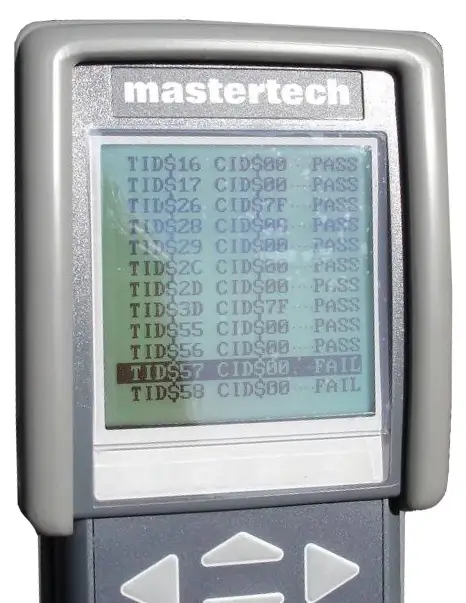 provide access to on-board monitoring test results for specific monitored systems. When you enter this mode, you choose which system you want to monitor. It allows access to test results for on-board diagnostic monitoring tests of specific components that are continuously monitored (misfire monitoring) and non-continuously monitored systems. There is NO industry standard data for Mode test. The only way to understand what you are seeing is use a scan tool that defines all of the data for you or to print out the Mode $06 information from a shop manual.
Mode 7
When you enter this mode, you are telling the PCM/ECM to provide access to emission-related trouble codes detected during the current or last completed driving cycle. The purpose of Mode $07 is to allow the scan tool to access codes that have been stored on the first drive cycle AFTER a PCM/ECM reset. Mode $07 is the “pending codes” selection.
Mode 8
When you enter this mode, you are telling the PCM/ECM to access control of on-board system, test or component. Mode $08 allows a scan tool to do bidirectional control of an onboard system or test.
Mode 9
When you enter this mode, you are telling the PCM/ECM to provide vehicle information. Mode $09 provides vehicle identification number and calibration numbers from all emissions-related electronic modules.
Mode 10
When you enter this mode, you are telling the PCM/ECM to provide access to emissions-related codes with permanent status after a clear/reset emission-related diagnostic information service. Mode 10 allows a scan tool to obtain “permanent codes.” These are codes only the module can clear. Even if you’ve made a successful repair and have cleared the codes in Mode $04, these codes will remain in memory until the computer has completed its own system test.
How To Calculate Grams per Second Based on Engine Size and RPMs
A rule of thumb for estimating Mass Air Flow (MAF) in grams per second based on engine displacement is that it roughly equals the engine’s displacement in liters at idle.
For example, a 3.0L engine should register roughly 3 grams per second at idle. At wide-open throttle (WOT), a common estimate is that the MAF reading should be approximately 40 times the engine’s displacement in liters
©. 2018 Rick Muscoplat
Posted on by Rick Muscoplat