
Add CarPlay to Your Car Without Replacing the Stereo
The Best Ways to Add CarPlay to a Car’s Current Radio
Quick Summary
Want to add CarPlay to your car? You’ve got three options.
1) Replace the radio with an Apple CarPlay and Android Auto capabilities
2) Install a standalone CarPlay / Android screen
3) Or install an integration module.
The right choice depends on how clean you want the install to be, how much you want to spend, and how comfortable you are taking a dash apart. Most of the time, the job is easier than people expect—but only if you approach it the right way.
How I Approach Adding CarPlay or Android Auto
I’ve done a few of these installs, enough to know that people usually start in the wrong place. They go shopping first. I don’t. I start by looking at the car. Here’s what you need to know:
How integrated is the factory radio — Does it control HVAC? Does it tie into vehicle settings? Is there room in the dash for a replacement? If so, that pretty much locks you into replacing the entire unit with a compatible audio system.
How important is the music/sound quality to you? — The stand-alone units have mediocre sound quality unless you have an AUX port in your current radio. But they’re fine for navigation and other apps.
How comfortable are you with removing dash panels? — Installing a new vehicle-compatible head unit is the best way to go, but you’ll have to install it yourself or pay an audio shop to do it. If you’re not comfortable removing trim panels and wiring harnesses, then stick with a standalone screen.
The Cleanest Way: Replacing the Factory Radio
If I’m doing this for myself—or for someone who wants it done right—I usually replace the head unit. There’s no shortcut that beats a proper aftermarket Apple CarPlay or Android audio system. Once it’s installed, the unit and the vehicle-specific trim panel make it feel like it belongs in the car. The touchscreen is responsive, the audio is clean, and everything just works the way it should. But it’s a bigger job and far more costly than the other options
You’ll have to remove the trim panels around the radio. If your steering wheel controls operate the radio, you’ll have to install a module to the steering column harness so those buttons still work. That will add to the cost. You’ll need a new wiring harness to connect the new unit to power and your speakers. On newer vehicles, you may even need an interface just to keep warning chimes and factory features alive. Yet, once it’s done, it’s done. No suction cups, no dangling wires, no compromises.
The Fastest Way: Adding a Standalone CarPlay Screen
If you don’t want to tear into the dash, then the easiest and cheapest option is to buy a wireless remote screen. The early versions didn’t work well, but the latest models work fairly well, especially for the price. The unit mounts to your dash, and you plug it in to power.
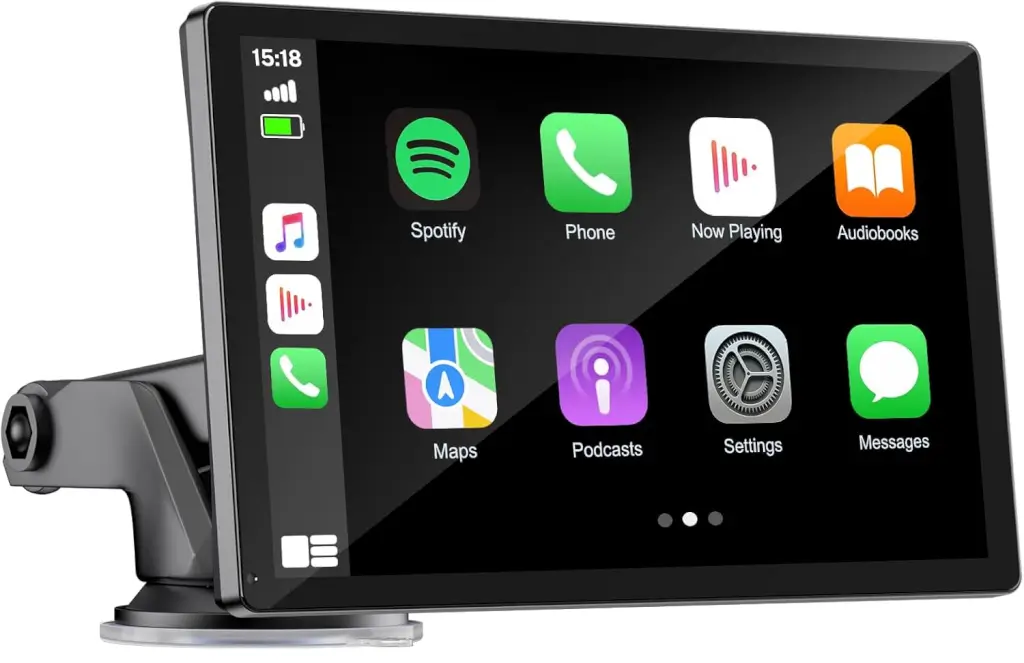
Standalone Carplay screen
CarPlay and Android Auto — connect to your phone’s Bluetooth and WiFi to access map navigation, calling, email, notifications, music, and more, like:
Parking Monitoring and Collision Sensor — When parking monitoring is enabled (requires the ACC power cable), it automatically starts a 15-second video recording and locks it if the vehicle detects vibration. Upon collision, it will lock the incident video and display a lock icon at the top of the screen.
4K Front Camera and 1080p Night Vision Rearview Camera — the car screen features a 4K front camera and a 1080p waterproof rearview camera. The front 4K camera captures your driving journey with precision and clarity, enhancing safety. This unit includes a 7-meter rear camera cable that syncs with your reverse lights, enabling extremely convenient installation.
The first time I installed one, it felt almost too easy. Mount the screen, plug it into a 12-volt outlet, pair your phone, and you’re up and running. No dash removal, no wiring diagrams, no guesswork.
What impressed me most was how quickly it booted up and connected. Within seconds, I had maps, music, and messages right on the screen. But here’s where experience kicks in: The screen isn’t the issue—it’s how you get the sound into the car. That’s where people either end up impressed or disappointed.
The Auxiliary Port Method to Get Good Sound
If your car’s radio has an AUX input, that’s the best way to get the sound into your car’s speakers. But if you’re relying on FM transmission, you’re working with limitations. It’ll get the job done, but you’re never going to get true, clean audio quality.
Still, for someone who just wants to add CarPlay or Android Auto to their radio without tearing the car apart, this is hard to beat. Just run a stereo cable from the screen to your aux port on your current radio, and you’ve solved the sound quality problem.
The Factory-Look Option Most People Don’t Know About
If you want everything to look completely original—no aftermarket screen, no visible changes- then you want an integration module. These systems tie directly into the factory display and essentially “inject” CarPlay into it. From the driver’s perspective, it feels like the car came that way.
But this is where things get technical fast.
You’re working with vehicle-specific systems, tapping into factory wiring, and sometimes dealing with firmware compatibility. It’s not something I recommend unless you’re comfortable reading wiring diagrams and troubleshooting electronics.
When it works, it’s beautiful. When it doesn’t, it can turn into a headache.
Where Most People Get It Wrong
People rush the mounting and end up with a screen that blocks their line of sight. Or they run cables across the dash instead of taking a few extra minutes to route them cleanly.
And then there’s the audio issue. They pick an FM frequency that’s already crowded, and suddenly they’re dealing with static and interference.
None of these are complicated problems—but they make a huge difference in how the system feels day to day.
How to make the decision
It really comes down to cost and how long you plan to keep the vehicle. If it’s an older vehicle or you’re on a budget, I’ll throw in a portable screen and call it a day. It’s quick, it works, and you’re not investing more than you need to.
But if it’s a daily driver that you care about and you’re confident enough to pull the dash apart, I recommend installing a proper head unit and trim kit to match your current dash. That gives you a clean look and a sound, integrated, solid system.
Final Thoughts
Adding CarPlay or Android Auto is one of those upgrades that changes how you use your car every single day. Navigation becomes easier, communication is safer, and everything just feels more modern.
And the best part? You don’t need a new car to get it. You just need to decide how you want to approach it—and do it the right way.
©, 2026 Rick Muscoplat
Posted on by Rick Muscoplat