
The Right Way to Clean Corroded Battery Terminals
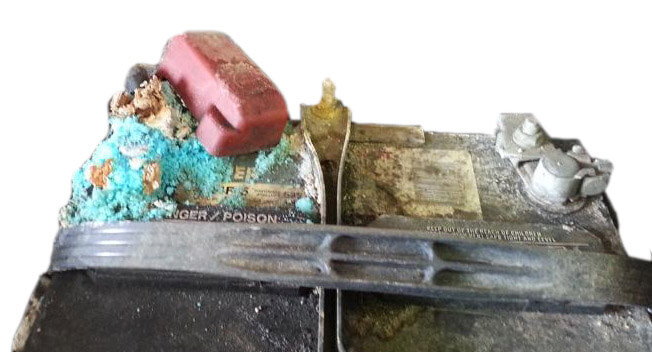
Step-by-Step Battery Terminal Cleaning Procedure
Quick Summary
Corroded battery terminals are one of the most common — and most overlooked — causes of electrical gremlins and no-start complaints. The white or bluish-green buildup that forms on battery posts and cable clamps is primarily lead sulfate and copper sulfate, and even a thin layer creates significant resistance in the circuit. That resistance means the starter motor receives less current than it needs, leading to slow cranking, intermittent starts, or a complete failure to start even when the battery itself is fully charged. Keeping terminals clean and properly torqued ensures the battery can deliver and accept full current — critical not only during starting but during charging, when a dirty connection can prevent the alternator from properly replenishing the battery after each start.
This article will show you step by step how to clean battery terminals and posts.
1) Turn off the ignition and remove the key
2) Put on safety glasses and chemical-resistant gloves
3) Disconnect the battery terminals
4) Move the cables clear of the posts so they can’t accidentally make contact
5) Removing heavy buildup from the top of the battery case with a spray degreaser and a rag
6) Use a dedicated battery terminal cleaning brush to clean the terminals and the battery posts
7) Rinse and dry
8) Reconnect the battery terminals
9) Apply a thin coat of dielectric grease, petroleum jelly, or a purpose-made battery terminal protector spray to both posts and clamps to slow future corrosion
10) Perform a throttle body relearn procedure to recalibrate the throttle plate
Tools Needed to Clean Battery Terminals
• Nitrile gloves
• Safety glasses
• 10mm socket or wrench
• Paper towels
• Battery terminal puller
• Battery post cleaning brush
• Battery terminal protector spray
• Battery corrosion cleaner
• Spray degreaser and rags
• Baking Soda or Spray Battery Terminal Cleaner
Step-by-Step Guide: How to Clean Car Battery Terminals
Step 1: Disconnect the Negative Terminal — Always remove the negative cable first. This reduces the risk of accidental short circuits if a tool contacts metal while you’re working. Move the cable away from the battery after removal.
Step 2: Disconnect the Positive Terminal — If either terminal is stuck, use a battery terminal puller. Avoid prying with screwdrivers, which can crack the battery case.
Step 3: Remove Loose Corrosion — Wipe away as much dry corrosion as possible using paper towels. This prevents the creation of a messy, acidic paste during the neutralization process.
Step 4: Neutralize the Acid — Mix baking soda with water to form a solution. Apply it to:
• Battery posts
• Terminal clamps
• Battery top surface
You’ll notice fizzing as the baking soda neutralizes battery acid residue. Afterward, wipe everything clean and dry.
Step 5: Clean the Battery Posts — This is the step 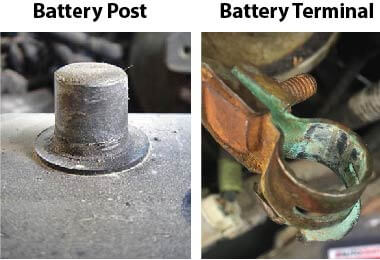 many people skip. Use a battery post brush and rotate it several times around each post until bright, shiny lead is visible. The cleaner the metal, the lower the electrical resistance.
Step 6: Clean Inside the Terminal Clamps — Use the terminal cleaning brush to clean the inside surfaces of both cable terminals. Continue brushing until you see clean bare metal. This step is critical for restoring maximum current flow.
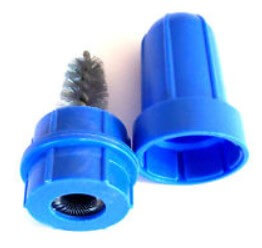
Clean your battery battery terminals and posts with a special wire brush
Step 7: Clean the Battery Case — Many people don’t realize that dirt and moisture on the battery case can contribute to parasitic current leakage. Spray cleaner onto a towel and wipe the entire battery case clean. Never spray cleaner directly onto sensitive electrical components.
Step 8: Reinstall the Positive Terminal — Install the positive cable first. Tighten until secure. A properly tightened terminal should not rotate on the post.
Step 9: Reinstall the Negative Terminal — Reconnect the negative terminal and tighten securely. Again, the terminal should not rotate.
Step 10: Protect the Connection — Apply battery terminal protector spray or dielectric battery protectant. This protective coating helps prevent future corrosion and extends battery life.
Important Warning Before Disconnecting a Battery
Before you begin the cleaning process, understand that modern vehicles are far different than older cars. Disconnecting battery power can cause:
• Electronic throttle body relearn issues
• Steering angle sensor faults
• Radio security lockouts
• Power window recalibration requirements
• Seat memory loss
• Clock and computer resets
• Battery monitoring system faults
• No-start conditions on some vehicles
If your vehicle is equipped with advanced electronics, I recommend using a memory saver connected through the OBD-II port or power outlet before disconnecting the battery. The best way to avoid all these issues is to supply backup power to keep all memory alive while you clean the battery terminals and posts. To learn how to maintain memory, read How to Change a Car Battery Without Losing Adaptive Memory
Why Battery Terminal Corrosion Is a Serious Problem
Battery corrosion isn’t just ugly. It affects the entire charging and starting system. Corroded terminals can cause:
• Slow engine cranking
• Intermittent no-start conditions
• Dim headlights
• Battery charging problems
• Premature battery failure
• Increased alternator workload
• Electrical system voltage drops
When corrosion increases resistance, the alternator must work harder to recharge the battery. Over time, that extra strain can shorten alternator life.
What Causes Battery Terminal Corrosion?
Battery terminal corrosion usually forms when hydrogen gas escapes around the battery posts and reacts with moisture and the metals used in the battery terminals. Common causes include:
• Aging batteries
• Overcharging
• Loose battery connections
• Acid seepage around battery posts
• Extreme temperature changes
• High underhood heat
White, green, or bluish deposits are all signs that the connection should be cleaned immediately.
Can You Use Coke to Clean Battery Terminals?
You’ve probably seen videos recommending Coca-Cola. Yes, Coke can dissolve some corrosion because it contains phosphoric acid. However, I don’t recommend it because the the professional battery cleaning methods I show here are:
• Far More effective
• Less messy
• Less likely to leave sticky residue
• Better at preventing future corrosion
Baking soda and a proper battery terminal brush remain the best approach.
If the corrosion returns quickly after cleaning, see this post for the cause
For information on how to replace a battery terminal, see this post.
©, 2018 Rick Muscoplat
Posted on by Rick Muscoplat